Generate Realistic Placeholder Text with Our Fake Text Generator
Introduction
Being a designer, developer, writer, or student: it is a typical issue when you need some fake text to get your project going. Dummy content can be a pain to write manually and time-consuming. That is where a Fake Text Generator will come in. With this tool, you can create realistic placeholder text immediately, as you can concentrate on designing, setting up, and testing the site as well as planning your content without any time wastage. All you have to do is make a few clicks, and you have text that appears natural and professional.
What Is a Fake Text Generator?
A Fake Text Generator is an online application to create fake text that looks like real writing. The content is also suitable across a broad range of projects, unlike generic Lorem Ipsum generators, because it can be used in a variety of projects since it can be customized to fit various styles and lengths. It is used by designers to create an idea of the layout of the webpage, by developers to test their apps and software, and by writers to rehearse or draft their content. In brief, it is a convenient tool that saves time and gives realistic text each time one has need.
Why You Should Use a Fake Text Generator
It has several benefits to employ a Fake Text Generator:
- Saves time. You do not need to type paragraphs manually; you get instant text.
- Remains consistent: Makes formatting and structure consistent throughout your project.
- Improves workflow: Allows designers and the developers to concentrate on functionality and not filler text.
- Flexible for various purposes: websites, applications, presentations, prototyping, and learning tasks.
Key Features of Our Fake Text Generator
Our software tool is meant to streamline your work process:
- Instant adjustments: Type using words or paragraphs.
- Instant generation: Instantly get realistic dummy content.
- No sign-up: Use immediately.
- Keeping up with the devices: Compatible on desktops, tablets, and mobile devices.
- Stylish layout: Your pages will read, and your mockups will appear professional.
How to Use Our Fake Text Generator
It is easy to use our tool, and it only takes a few steps.
Step 1: Open the Tool
Open the Fake Text Generator in onlinetexttools.io. The interface is user-friendly and simple to navigate.
Step 2: Select Text Options
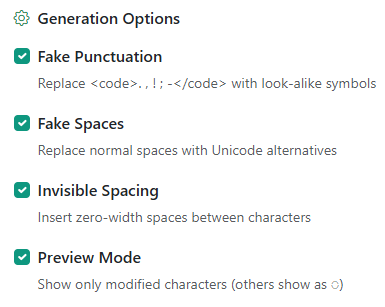
Select punctuation, spaces, or invisible spacing, which you require in your text. This can be changed according to your design or content needs.
Step 3: Generate Text
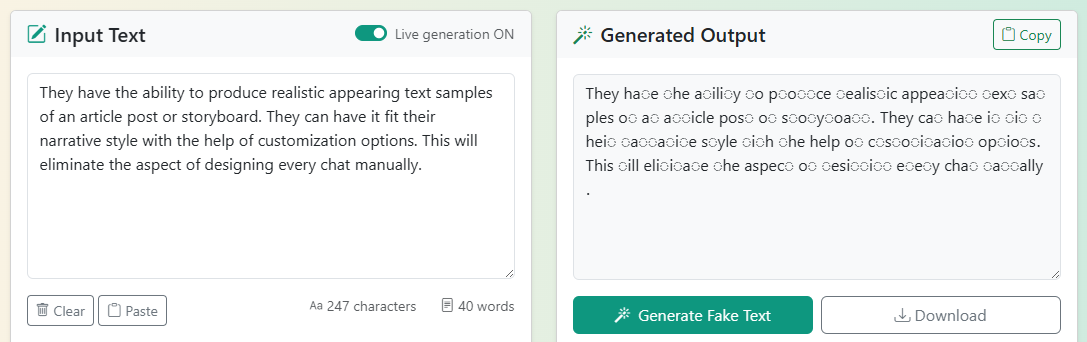
Click the “Generate Fake Text” button. The tool will automatically convert your text to unrealistic dummy text.
Step 4: Copy and Use
After reading the text, copy it and paste it into your project. In case you need more variations, you can repeat the generation process.
Tips for Best Results:
Adjust the text size to your design to suit the layout. Test various lengths and variations and find out what suits your design.
Who Can Benefit from a Fake Text Generator?
Fake Text Generator is a multitasker that can save time for various professionals and creators to enhance their work process. The way in which different users can benefit is through the following:
Web Designers
Realistic text fills a site, with the designers being able to view layouts, fonts, and spacing before the final content is prepared. This assists in making sure that the design is balanced, readable, and attractive even when operating with incomplete projects.
App Developers
Developers are able to test the appearance of the text in the menus, buttons, forms, and notifications. A realistic placeholder will save you from having a functioning user interface as well as content that will flow and not have to be broken or overflow in an ugly manner.
Content Writers
The tool can help writers write some paragraphs, play with formatting, or even plan out some papers without having the actual content. It helps them to concentrate on flow, tone and readability and be productive. Another Word Counter tool can also be used by content writers during their long writing process.
Students' presentations
In assignments, presentations, or practice projects, it is useful to generate dummy text to enable students and teachers to develop realistic examples. One can use Excel to simulate reports, project deliverables, or learning material without concern with the final content.
Graphic Designers
In designing posters, social media graphics, brochures, or presentations, it is possible to add dummy text that displays how the final version will look. It allows seeing spacing, alignment, and general aesthetics, which accelerates the design process and makes it more accurate.
Marketing Teams
Marketers are able to develop sample text on the landing pages, newsletters, or email campaigns within a short time. This lets them test layouts, gauge engagement, and plan messaging and will save time and effort before actually writing real content. Marketing teams can also try our free Hashtag Generator tool for generating engaging hashtags for advertisements.
Authors and Scriptwriters
Placeholder text may be used to fill in sections of a story or a storyboard when the author is editing a
story, writing a script, or planning a book. This enables writers to allow structure, pacing, and layout
without being preoccupied with earlier content generation.
In general, the Fake Text Generator fits any person who requires a text filler fast. It makes your
projects look real and professional, which helps you save time and, at the same time, ensures high
quality of design, layout, and presentation. Authors and scriptwriters can use the Text Cleaner tool to
check for any grammatical mistakes before publishing their content.
Tips for Getting the Most Out of Fake Text
- Select the appropriate length: Select words, sentences, or paragraphs to correspond to the design purpose.
- Integrate with other tools: Integrate with text formatting, translation, or typography tools to produce better results.
- Test variants: Make various text samples so that you can make sure that your layout will be used with varying content.
- Do not overuse: Fake text is useful to practice and visualize, but never use it in real projects.
- Check readability: Ensure that the text used as a placeholder is also readable and the text in a layout looks natural.
Conclusion
Fake Text Generator is a crucial tool for designers, developers, writers, and students alike who deal
with content or layouts. It is quick, it allows you to work without having any delays, and it makes your
projects look professional until the very moment when you are going to have a final text.
Are you willing to streamline workflow and make it smoother? Check out our Fake Text Generator and
create realistic fake text in a moment.