Fake Text Generator
Transform any text into visually identical Unicode homoglyphs for testing purposes
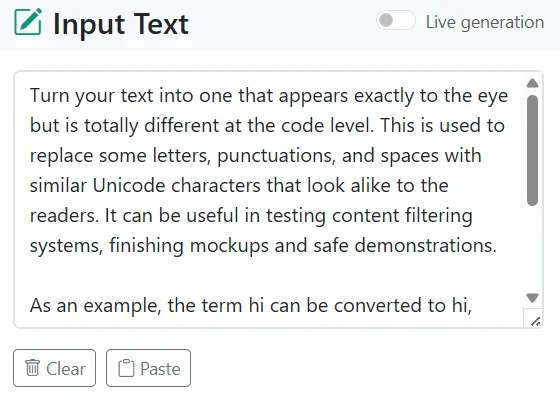
Turn your text into one that appears exactly to the eye but is totally different at the code level. This is used to replace some letters, punctuations, and spaces with similar Unicode characters that look alike to the readers. It can be useful in testing content filtering systems, finishing mockups and safe demonstrations.
As an example, the term hi can be converted to hі, where the second character of the word is not given the regular letter i but a Unicode homoglyph that appears identically. These replacements do not alter the physical appearance of the text that makes them useful in testing the software to respond to disguised input.
Letters are replaced by default by the generator. You also have the opportunity to convert punctuation marks, spaces and add an invisible character between characters with more options. The outcome is an appearance of normal text yet textually unique.
How does the fake text generator work?
The Fake Text Generator takes the given text and converts it using Unicode homoglyphs and invisible characters. This is how it happens in the following steps.

- Fake Punctuation: replaces regular punctuation with similar looking Unicode characters.
- Fake Spaces: replaces ordinary spaces with the same appearance as Unicode space characters.
- Invisible Spacing: adds zero width character spaces to hide the text by not changing its look.
- Display Fake Characters: just the changed characters appear as ◌ so you can see what has changed.
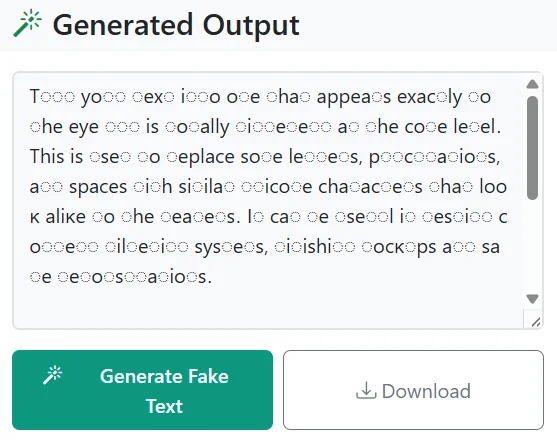
The output is visually identical to human readers, but coded in a different manner that is useful in experiments and filter testing.
Key Features of Fake Text Generator
- Substitute standard letters with graphically equivalent Unicode characters.
- Replace punctuations with characters that resemble but are different in codes.
- Disguise text on the code level by adding visible zero characters between letters.
- Display the replaced characters with the ◌ character to view briefly.
- Copy or download the text that has been transformed to use in testing or making examples in real-time.
- Keep a natural visual look and alter the technical structure of the content.
- Suitable to use in games, events, research, testing, as well as to use it in the daily choices.
Who needs our fake text generator?
Works by writers and narrators are enhanced using fake text. They can come up with characters and scenes that show a natural appearance. This saves some time and also deepens the contents and improves the creative flow. It is frequently used together with other tools, including a Random Sentence Generator or a Random Letter Generator , to change the tone and add some sort of random styles of dialogue. Already crafted dialogue and character made disguises allow the creators to explore different storylines and experiment on how the characters would behave in different situations. Before script or story completion, pacing, flow of dialogue and how to interact with readers can be more easily pictured.
They have the ability to produce realistic appearing text samples of an article post or storyboard. They can have it fit their narrative style with the help of customization options. This will eliminate the aspect of designing every chat manually. They can also better refine the developed text with Text Replacer or Text Cleaner to ensure the consistency of the drafts. False text may also allow writers to brainstorm new concepts or illustrate the style used to communicate in their copy. It offers them the advantage of demonstrating authentic examples within clients, audiences or editors without necessarily using actual words.
Teachers make communication practices using fake text. Trainers are able to replicate role play scenarios of customer service sales or digital etiquette. This brings with it realistic learning but does not put sensitive data at risk. Other ways in which lessons can be further customized is by dividing dialogues in Split Text or duplicating patterns in Text Repeater as group handouts. It also enables the teachers to prepare examples safe to distribute in classrooms and workshops. Modification of material can help the teacher to make instruction engaging, participatory, and can help trainees to practice with realistic, risk free content.
Developers can populate prototypes and layouts with convincing content. This makes testing layouts fonts and moderation features easier. Developers who want even quicker placeholder formatting often rely on tools like Text Reverser or Line Break Remover to clean or shuffle mock content on the fly. Screenshots and mockups appear professional without the problem of spreading real user information. Fake text is also used to assist the developers in fake user interactions so as to rampant bugs or design problems are detected early on in the development cycle. It supports smoother demos and makes prototypes look complete and production ready.
The marketers are able to create campaigns using the appearance of genuine messages. They are able to develop product showcases, customer engagements or previews to social media. This assists them to display ideas without revealing the personal discussions. Combined with a Hashtag Generator or Case Converter, marketers can format captions fast and power up engagement-ready mockups. Fake texts enable marketing organizations to test a variety of messaging techniques at a low cost and speedily. They are able to create simulated advertisements, A/B testing to flow contents and even anticipate the appearance of the campaigns in the eyes of the customers without necessarily awaiting actual customer information.