Case Converter
Change your text into uppercase to lowercase
Case Converter will assist you to change any text into the appropriate format immediately. Text cases can be changed within a few clicks with the help of this tool, regardless of whether you are writing an essay, report, or web article. It makes your content always appear tidy, standardized, and professional without wasting hours on editing.
Case Converter aims to make text editing more productive and quicker. Large blocks of text or even brief phrases would be equally easy to convert. No need to install any software or create an account and everything is done in your browsers. This tool saves you precious time whether you are a student, writer, or developer, that would have been spent on editing capitalization mistakes manually.
It is capable of supporting many styles, including, but not limited to, the uppercase, the lowercase, the sentence case, the capitalized case, and the alternating case, and hence can be used in almost any manner. Whether it is writing an academic paper or coding, making a social media post, or simply writing regular messages, the Case Converter will make sure that your text is always presented the way you want it to be.
How Does Case Converter Work?
With such simple steps you are able to convert your text cases within few seconds:
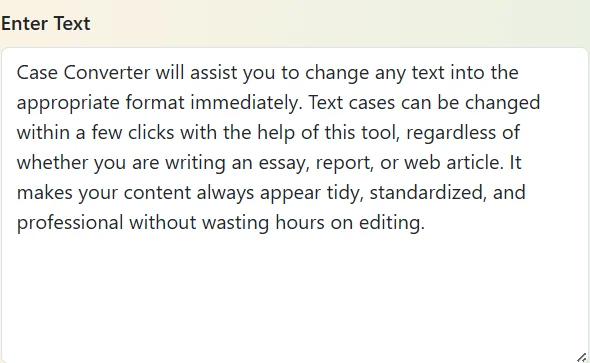
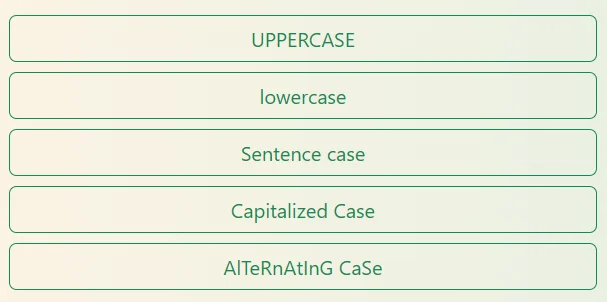
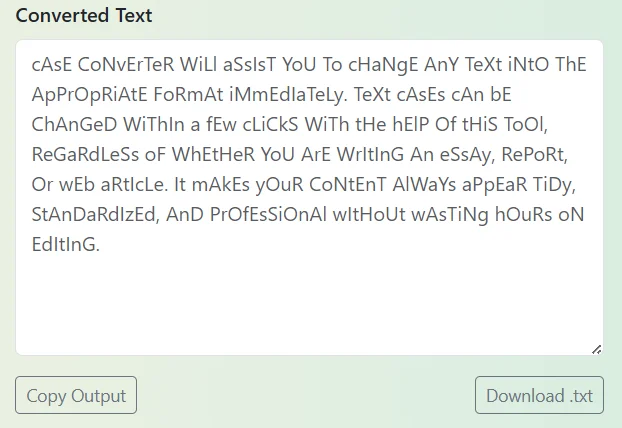
This is all you should do, to get the fast and correct formatting of the text.
Key Highlights of Case Converter
- Change between various text case styles such as upper, lower, sentence, title and alternating instantly.
- Create and work online without downloading any data or registering an account. Handles both short and long blocks of text easily.
- Manages both brief and extended pieces of writing.
- Free of use and can be used with all kinds of gadgets like desktops, tablets, or mobiles.
- Real time conversion allows you to view changes as soon as you implement them.
Why Use Our Case Converter?
Our Case Converter is developed to be easy to use and precise. It saves time to any person who is constantly typing and is keen on having all the letters capitalized in the whole work. It can be employed on emails, blog posts, and so on, and reports and even captions. The Case Converter is able to fix the issue and correct every word at once and with perfection.
This is also a tool that can assist in keeping a professional writing. Correct capitalization enhances readability and makes the impression of what you have to say powerful. Whether it is a client-related content you are creating or you just want to do a project of your own, the Case Converter will ensure to deliver a neat and polished output each time.
Who Should Use Our Case Converter Tool?
Authors and editors usually have to take care that all the articles, blogs, and publications are formatted in the same manner. The Case Converter also assists them to standardize capitalization within several seconds, saving editing time and enhancing the workflow in general.
It is particularly useful when it comes to proofreading where you need to rashly change the headings in the article, the subheadings or quotes to suit your desired style. You can also use it to make handwritten manuscripts or handwritten newsletters or online publications with capitalization like it was made every time. It is also popular among many editors giving it a clean-up before they publish user-generated content. This is time and energy saving and at the same time giving the document a professional appearance.
Another tool that helps with refining your written work, prior to conversion into a case, may be Duplicate Line Remover or Line Break Remover to refine sloppy formatting.
In making content search engine-friendly, proper capitalization also matters as far as readability and visual attractiveness is concerned. It is a tool that allows copywriters to format the text of headings, subheadings, and metadata in a small amount of time and in line with SEO requirements.
You can clean up your web pages and make them look more appealing to visitors by the use of coherent title or sentence case. The Case Converter can be used by SEO authors to craft blog titles, product descriptions and meta tags according to brand tone. One also can use it to do the bulk editing of the work when dozens of headings or sentences should be written in the same style. The tool enhances the presentation of the contents and saves hours of manual adjustment.
After formatting the text you can use it with our Hashtag Generator to generate hashtags with key words that can be used to promote your blog and social networks.
The Case Converter helps professionals who tend to require creating documents, emails, and presentations to make their communication appear clear and professional. It aids in the consistency of tone and format which is vital in corporate communication.
This tool is a fast method of structuring the content beautifully whether you are developing reports, proposals, messages to clients or marketing materials. It enables specialists to save time on manual corrections and do the more fruitful work. It is also possible to organize data into formatted data to be sent to the spreadsheet or CRM notes with the Case Converter so that all business documents are created with similar appearance.
Our Split Text tool could be useful to separate long text into manageable smaller parts to organize or rearrange the text in a more efficient manner.
Whether it is the writing of captions and bios or the development of marketing posts, the process of regular capitalization on all platforms is crucial to the brand. The Case Converter makes this process easier by offering fast format choices that have your posts consistent and smooth.
It allows social media professionals to generate catchy headlines, stylized hashtags or post text within seconds. It enables them to play with the tone by turning the content small to write deliberate unstructured posts or capitalized for imposing advertisements. This tool is ideal to undertake numerous branding accounts that have different but consistent format requirements. It assists in developing attractive posts and saving time with hand-made changes.
Once you have structured your captions, you can also give a preview of how your work will appear by looking at the readability and structure of the work using our Random Sentence Generator as a source of creative ideas or better wording.
This tool can help students and other learners to know how to capitalize sentences and make them clear. It assists them to write in various forms of cases, enhancing grammar and writing style in any language.
It may have its use especially when typing up assignments or practicing an essay where standard layout must be taken. By learning to observe the decisions made by each case, learners are able to build better writing habits. The tool also helps to grasp spelling rules of the English capitalization like proper nouns and the beginning of the sentence. It can be submitted by students as well as be used to learn using it, making it accurate in all documents.
To further help learners, learning materials such as Palindrome Checker, can be used to ensure that one has a lot of fun in writing, and they are exploring the word patterns and letter sequences.
Frequently Asked Questions (FAQs)
- It serves a variety of styles such as:
- UPPERCASE - changes all characters to upper case letters.
- lowercase- changes all the letters into small letters.
- Sentence case- capitalizes at the beginning of each sentence only.
- Capitalized Case The capital is added to the first letter of every word.
- aLtErNaTiNg cAsE - switches between lower and upper case letters.