Line Break Remover
Fix unwanted line breaks, improve readability, and streamline content
The Line Break Remover: This is a very simple and yet efficient online utility to clean up messy text or poorly formatted text with a lot of line breaks by deleting them instantly. Whenever you copy or paste documents, whether it be PDF files or emails or Web pages, the information shows a lot of unwanted line breaks that interfere with the readability and flow of the text. Such forms of hidden characters as \ n, \r, or \r\n give rise to uneven spacing between certain parts of your content and interrupted paragraphs that make your text look messy.
Use the Line Break remover and instantly turn broken, difficult-to-read text into continuous, smooth reading material that appears polished and professional. You can save time and effort by either editing papers, writing material to be posted on a website, or cleaning up some text to be used in marketing. This tool can save you a lot of time. It makes your text clean, consistent, and correctly formatted to avoid any form of manual correction. The Line Break Remover is a browser-based application and therefore does not require any downloading or installation. It is a quick, secure, and confidential method of dealing with either a large amount of text or a small amount of text easily.
How Does Line Break Remover Work?
These are the easy and effective ways to delete line breaks:
- Step 1: Open the Line Break Remover tool.
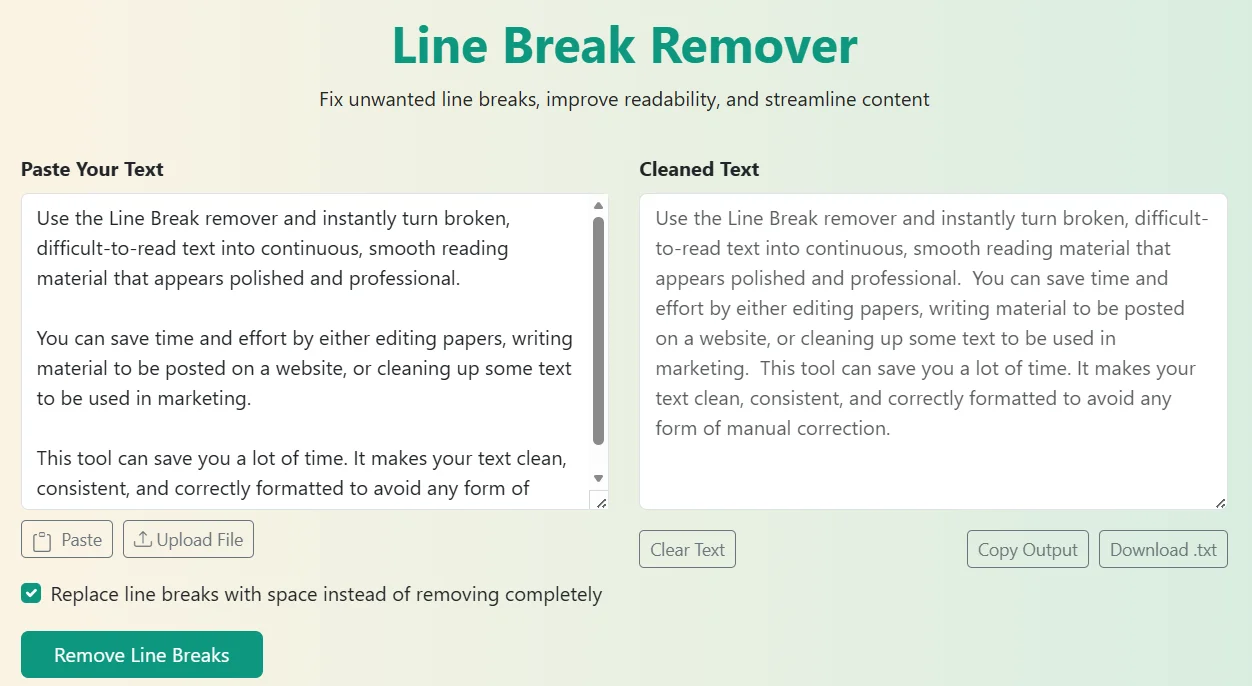
- Step 2: Copy and paste your text into the text box.
- Step 3: Click “Remove Line Breaks.”
- Step 4: The tool will simply identify and delete characters like \ n, \r, or rn.
- Step 5: Instantly copy or download the clean text and use it wherever it is necessary.
It can be done within a few seconds and does not demand any technical expertise. Clean up whole paragraphs, documents, or datasets with ease, and you will never lose the flow in what you are writing due to underlying formatting issues.
Key Highlights of Line Break Remover
- Immediately eliminates the undesired line breaks from any text.
- Uses sentence structures and punctuation to make it read naturally.
- Works well with desktop, tablet, and mobile browsers.
- Choice to use a space instead of line break or not.
- All browser-based and therefore data privacy is guaranteed.
- Processes big text blocks effectively, without slowness.
- Clean and minimal interface that provides a seamless user experience.
Who Should Use Our Line Break Remover Tool?
The Line Break Remover is intended to be used by a broad group of users that has to work with formatted, copied or structured text. This tool makes your workflow easier, no matter whether you are a writer, a student, an editor, or a professional, because you always get to have clean and readable output.
Bloggers and writers frequently replicate the text of different sources on the internet, notes, or earlier drafts. These copied passages may be accompanied by inconsistent line breaks, discontinuing the rhythm of writing and complicating the editing process. The Line Break Remover can automatically convert this broken text into a clear, well-aligned paragraph with a single click. It also ensures you spend more of your time being creative rather than formatting because of the natural spacing of words and sentence construction. It will suit writers who desire to produce work that appears clean, polished, and publication-ready.
Our Case Converter can also prove helpful to writers who need to standardize the text form or the Palindrome Checker can add some creative elements to writing.
Transcriptionists are often presented with transcripts that contain OCR errors, software formatting/voice recognition errors, and line breaks. The same is true with the editors who are required to review the text files or convert the scanned text into readable files. The Line Break remover has the ability to automatically identify these unwanted breaks and eliminate them immediately, enabling the professional to edit the text more effectively than before. It also makes sure that the transcript or document is consistent, and it is easier to proofread. The tool can be very helpful to any person who is dealing with large volumes of text data to enhance productivity and text readability.
To further polish your transcripts, you can then run our Duplicate Line Remover together with this tool to remove repeating lines in your transcripts to achieve an even more professional output.
Customer care departments commonly paste the chat logs, the messages sent by customers, or responses to their tickets in reports or communication systems. Such messages can be line-divided to distort alignment and readability. With the Line Break Remover, it becomes easy to clean up this information and formulate straightforward and professional communication records. It assists in keeping a steady flow of messages and makes the copied text appear clean until it gets to the clients or gets stored in a database. This is especially helpful with the CRM users who deal with textual communications every day.
Moreover, there are such tools as the Text Repeater to assist you in making quick response templates to repetitive communication tasks.
Office workers are often supposed to work with reports or business mail or data found in PDF files. The files may have irregular breakages or lines that may present a challenge in reading or presenting the content. The Line Break Remover is a fast and easy method of correcting these formats without the need to use complicated editing software. It assists employees in assembling neat reports, suggestions, and presentations by cleaning text within seconds. It will also make sure the presented documents have a similar structure and appear professional in all departments.
You can also consider Word Counter or Slug Generator to prepare documents and optimize them to look more readable and presentable to the audience.
Search engine optimization specialists and data entry workers tend to receive bulk information copied directly out of databases or forms, or even research on keywords. Using these sources may lead to the inclusion of unwanted line breaks to make data cleaning and formatting harder. The Line Break Remover makes this easier as people can use it to work with large text blocks in one go. This will save a lot of time in the preparation of clean data to be uploaded, analyzed or optimized. It comes in handy, particularly when an SEO expert is required to format text into web pages, metadata, or a content management system without a hidden break.
You can also use our Text Cleaner to delete remaining characters or the Random Sentence Generator to create test content to test out SEO.
Copying text in a PDF, scanned document, or email frequently results in additional line breaks, leaving the text in fragments. The Line Break Remover eliminates this problem because it is able to turn one continuous paragraph into broken paragraphs and back to a single, readable form of text. It is a great resource to the student, researcher and professionals who need to extract large amounts of text out of such resources on a regular basis. You can just paste your text, click once, and have a clean output ready to be copied into any editor or platform, typically (not needing the manual deletion of line breaks).
Once you have finished cleaning, you can generate filler text with our Fake Text Generator to format the tests or our Morse Code Generator to have fun with the coded message variants of your work message.
Why Choose Our Line Break Remover?
- Eliminates line breaks in real-time and without distorting the text meaning.
- All the work is fully online in a way that keeps your data safe and private.
- Effortlessly cleans lengthy documents, reports, or huge blocks of text.
- Perfect with students, writers, editors, professionals, and content managers.
- Works in close coordination with the Text Cleaner tool to bring more formatting fixes.